Why Fail to Transfer MP4 to iPad
According to Apple official website, iPad is only compatible with H.264, MPEG-4 or Motion JPEG video format with the following specifications:- If it is H.264 video, it should meet: up to 720p, 30 frames per second, Main Profile level 3.1 with AAC-LC audio up to 160 Kbps, 48kHz, stereo audio in .m4v, .mp4, and .mov file formats;
- If it is MPEG-4 video, it should meet: up to 2.5 Mbps, 640 by 480 pixels, 30 frames per second, Simple Profile with AAC-LC audio up to 160 Kbps per channel, 48kHz, stereo audio in .m4v, .mp4, and .mov file formats;
- If it is Motion JPEG (M-JPEG), it should meet: up to 35 Mbps, 1280 by 720 pixels, 30 frames per second, audio in ulaw, PCM stereo audio in .avi file format.
How to Play MP4 on iPad or iPad2 successfully?
In order to play MP4 or HD MP4 files on iPad or iPad2, we have to convert them to iPad supported video format with specific specifications.Bigasoft iPad Video Converter is just the ideal solution tool. With the optimized preset for iPad, it is just easy to convert all kinds of MP4 to iPad supported format with great quality and high speed. Besides it can also convert other video formats including AVI, MKV, WMV, ASF, MTS, VOB, MPEG, MOV, RM, 3GP, high quality 1080p or 1080i MKV, M2TS and more to iPad video MP4 or iPad H.264 720p video.
The following is a step by step guide on how to convert MP4 to iPad supported video format with the help of Bigasoft iPad Video Converter.
Preparation: Run Bigasoft iPad Video Converter
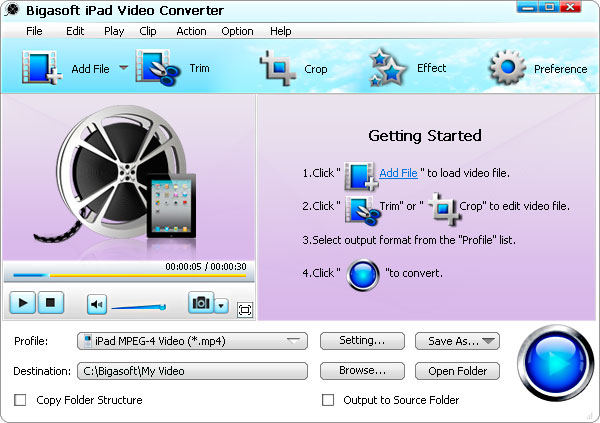
Free download Bigasoft iPad Video Converter (Windows Version, Mac Version), install and Run it, the following interface will pop up.
Step 1 Import MP4 video file
Click "Add File" button to import MP4 Video file. Or you can also drag your MP4 file directly to the main interface of Bigasoft iPad Video Converter.
Step 2 Set iPad MPEG-4 video format
Click the drop-down button on the right side of the "Profile" to select iPad compatible MP4 format like iPad MPEG4 Video(*.mp4) from "iPad" Category.Step 3 Convert MP4 to iPad supported MP4 format
Click "Convert" button to finish converting MP4 to iPad compatible MP4 format.Step 4 Transfer MP4 to iPad
Connect iPad to computer, start iTunes, and then import the converted MP4 file to iTunes for sync and transfer MP4 to iPad.Play MP4 on iPad on the go
With Bigasoft iPad Video Converter, it is just easy to transfer and play MP4 on iPad! It also applies to convert and play MP4 on iPad2/iPhone/iPod and more. It even applies to play other videos on ipad including AVI, MKV, WMV, MOV, MTS, MPG, FLV etc. Wait no more, just get this powerful iPad Video Converter now!Resources
FREE Download and Start Enjoying Now (9.67MB)Learn more about Bigasoft iPad Video Converter ...
Got a Mac? Free download your copy here (23.47MB)
Learn more about Bigasoft iPad Video Converter for Mac ...
Related Articles
How to import MP4 to iMovieHow to Import MP4 to Adobe Premiere Pro CS3/ CS4/ CS5?
WTV to MP4 Converter - Convert WTV, HD WTV to MP4, HD MP4
Convert MP4 to DV and Import MP4 to FCP with ease
How to Play MP4 on iPad, iPad2, iPhone or iPod?